You’ve probably already handled the visible parts of the move. The lease is signed, leadership wants a date, facilities is talking floor plans, and someone has asked for quotes from atlanta office movers. What usually gets missed is the part that creates significant risk: the move is also a technology shutdown, transport, restart, and disposal project.
That’s why experienced teams don’t treat relocation like a furniture exercise. They treat it like an operations cutover. Every workstation, server, phone, badge printer, lab device, and retired hard drive has to land in one of three places: moved, redeployed, or destroyed with documentation. If that decision happens too late, the move gets expensive fast.
The Strategic Relocation Blueprint for Atlanta Businesses
Atlanta isn’t a market where companies can afford to drift through relocation planning. In Q1 2025, the Metro Atlanta office market recorded 2.4 million square feet of leasing activity, with large-scale leases rebounding and sublease availability declining, which points to renewed momentum for relocations and related services, according to Lincoln Property Company’s Metro Atlanta office report.
That matters on the ground. When leasing activity rises, elevators, docks, electricians, low-voltage contractors, and quality movers get booked earlier. Waiting to organize the move until after the lease is signed is how teams end up accepting bad time slots, rushed vendor choices, and avoidable downtime.
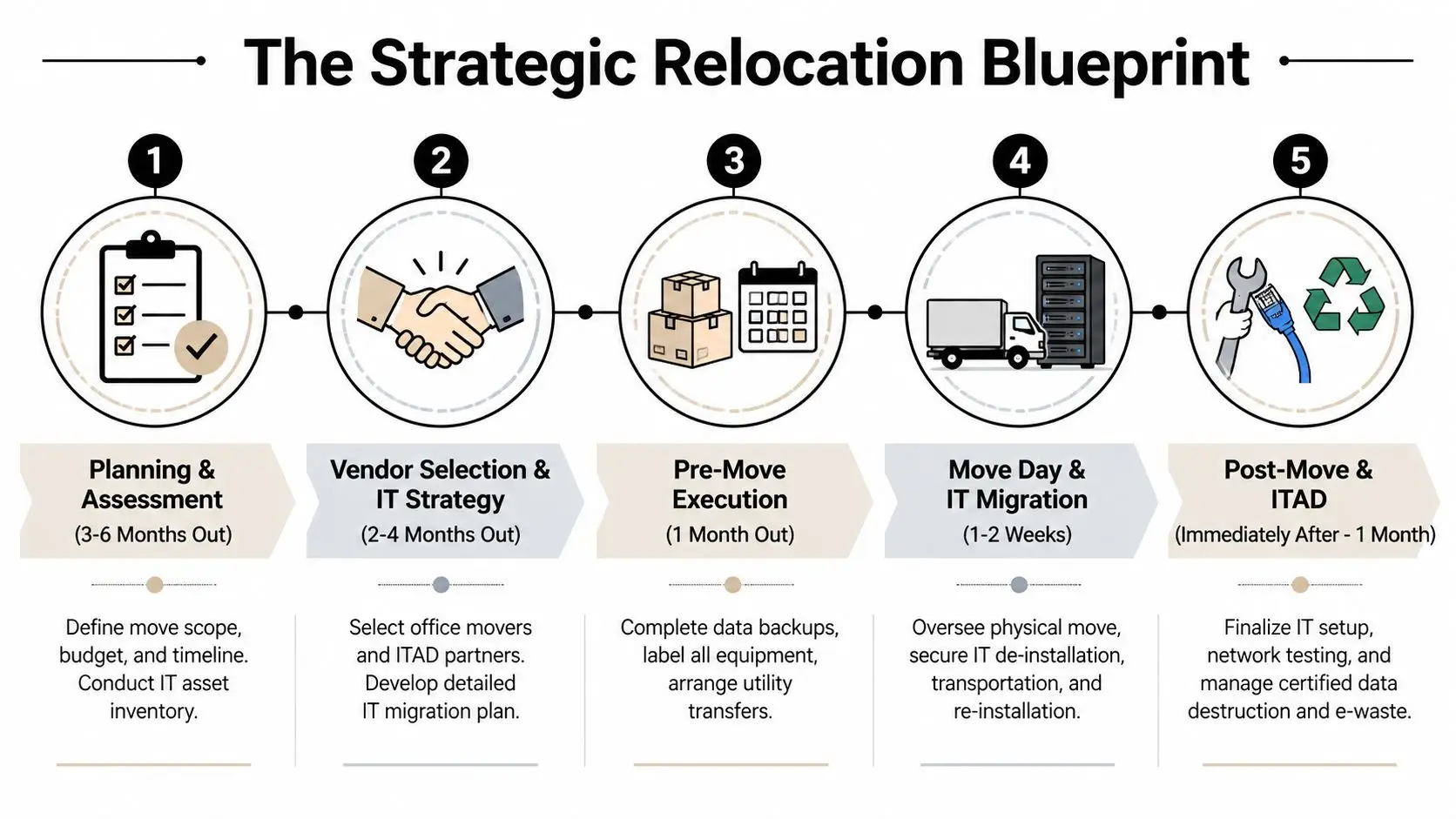
Build the move committee early
A workable move plan needs named owners, not a vague “project team.” At minimum, assign one lead each for facilities, IT, security, department coordination, and finance. If no one owns retired equipment, it will sit in a closet or get mixed into live inventory.
Use a single master schedule, but split IT into its own track. The network cutover, server de-installation, endpoint staging, badge access, copier migration, and telecom handoff need separate milestones. Furniture can often flex. Core systems usually can’t.
Practical rule: Let IT deadlines drive the relocation sequence, not the furniture delivery schedule.
Budget for what actually causes overruns
Most first-time relocation budgets focus on trucks, labor, and furniture installation. The hidden costs usually sit elsewhere: after-hours building access, insurance requirements, cable teardown, serialized equipment handling, temporary storage, and certified destruction for devices that shouldn’t make the trip.
A clean planning framework looks like this:
- Scope first: Decide what business units, departments, and equipment are moving.
- Critical systems second: Identify what must be available on day one.
- Disposition third: Remove obsolete assets from the moving plan before they consume labor and truck space.
- Documentation throughout: Keep chain-of-custody records for sensitive technology.
Teams often borrow residential moving checklists for sequencing because the basic discipline still applies. If you need a simple reminder on how moving timelines break down into manageable decisions, making your new house a home is useful for the planning mindset, even though commercial projects have more technical layers.
Treat relocation as an operations project
The best office moves have one trait in common: they’re run like deployments. The move date is just one milestone. The key work is in readiness reviews, exception lists, and escalation contacts.
For companies that need a dedicated process around furniture, equipment, and technology coordination, this office relocation planning resource is the kind of operational framework worth building into the move from the start.
Conducting a Thorough Pre-Move Asset Inventory
Before packing starts, freeze assumptions. Teams often think they know what they have until they open storage rooms, server closets, test benches, and executive offices. Then the surprises show up. Extra monitors, unsupported laptops, old firewalls, spare switches, copiers no one claimed, and a stack of drives that nobody wants to own.
A useful inventory doesn’t read like a furniture count. It works like an asset decision log.
Sort every item into three buckets
The first pass should classify assets as:
- Move: Devices and furniture required at the new location.
- Redeploy or sell: Working equipment that still has internal or resale value.
- Retire: Hardware that needs secure data destruction and recycling.
That third bucket is where relocation teams usually lose control. If retired devices stay mixed with production gear, movers transport items that should have been destroyed, and IT loses track of what still holds data.
Capture the details that matter later
For IT equipment, record the information you’ll need for chain-of-custody, insurance, setup, and disposition decisions.
| Asset field | Why it matters |
|---|---|
| Serial number | Ties the physical item to audit records |
| Assigned user or department | Helps confirm business need |
| Device type and model | Determines packing, handling, and resale path |
| Data status | Shows whether wiping or shredding is required |
| Destination | Move, storage, redeploy, or disposal |
Don’t leave this to memory. Use a spreadsheet, CMDB export, barcode scan list, or asset management platform. The tool matters less than consistency.
Retired equipment should be tagged before move week. If you wait until trucks arrive, everything starts looking like “maybe we still need it.”
Separate furniture logic from IT logic
Facilities teams often inventory workstations by count. IT has to inventory them by identity. A desk can be interchangeable. A laptop with local files, a workstation tied to a specialized application, or a printer with stored jobs is not.
That distinction also helps when departments ask to keep more than they need. A chair is a space question. A desktop or MFP is a data question.
For broad thinking on how workspace pieces serve multiple purposes, the Giorgi Bros. furniture guide is a useful lens, especially when teams are deciding what furniture should make the trip and what should be replaced or reconfigured instead.
Build disposal into the inventory, not after it
A strong inventory becomes the handoff document for movers, internal IT, and disposition partners. It should identify what’s active, what’s surplus, and what requires controlled destruction. That’s where a formal IT asset lifecycle management process becomes practical, not theoretical.
If the inventory is weak, every downstream decision gets slower. If it’s solid, the move becomes easier to price, easier to insure, and much safer to execute.
Executing a Secure IT and Data Center De-Installation
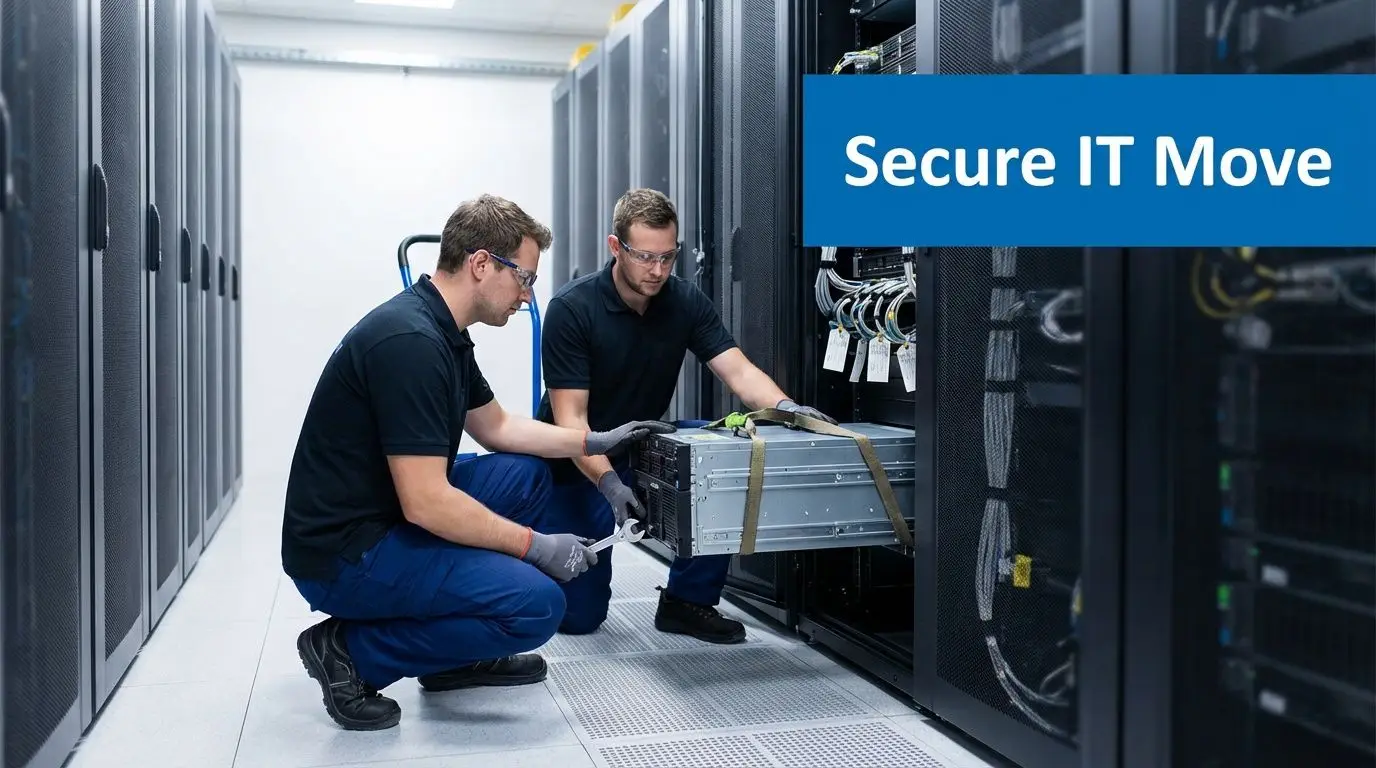
Without specialized knowledge, the move can go sideways. General office moving experience doesn’t automatically translate into safe handling of racks, switches, storage arrays, UPS units, trading desks, imaging workstations, or lab-adjacent technology. Sensitive infrastructure needs a planned shutdown and a controlled physical migration.
According to FMCSA data cited by Reworx Recycling, labor-only movers have damage claim rates three times higher than full-service movers, 15% versus 5%. For a standard office, that’s concerning. For a server room, it’s a direct warning.
What specialist handling actually changes
The difference isn’t just more careful lifting. Competent IT relocation crews work from a documented sequence:
- Application and system owners approve shutdown order.
- Infrastructure teams validate backups and dependencies.
- Rack elevations and port maps are matched to the new location.
- Equipment is labeled to reinstall in the same logical order.
- Anti-static packaging and proper rolling equipment are used in transit.
If any one of those steps is skipped, the physical move may still finish, but the restart drags. That’s what business users experience as “the move went fine, but nothing worked Monday.”
The server room is not a packing problem
Server racks aren’t just heavy. They’re exact. Rail kits, power distribution, cooling clearances, cable routing, and access aisles all matter. If the new room isn’t mapped before de-installation starts, technicians end up rebuilding under pressure.
Use a short verification list before shutdown:
- Rack compatibility: Confirm the destination layout matches rack size and mounting standards.
- Power readiness: Validate UPS, circuits, and failover assumptions.
- Cable labeling: Every uplink, patch lead, and power cord needs a destination.
- Handling protocol: Require anti-static materials and secure transport methods.
- Access window: Book dock, freight elevator, and after-hours permissions in writing.
A mover can transport a rack successfully and still cause an outage if reinstall sequencing isn’t aligned with your IT team.
Protect the restart, not just the ride
The move isn’t complete when the truck door closes. It’s complete when users authenticate, printers connect, conference rooms function, and line-of-business applications are live. That means the IT de-installation plan has to include the reactivation plan.
For high-density environments, branch offices with local infrastructure, or companies vacating equipment rooms entirely, a formal data center decommissioning process keeps the work controlled. It forces the team to address shutdown order, serialized removal, cable removal, media handling, and final disposition instead of improvising under deadline.
Atlanta office movers vary widely here. Some are excellent at desks and files. Some are ready for structured technology migrations. The safest assumption is that those are different skill sets until proven otherwise.
Managing Certified Data Destruction and E-Waste Compliance
The move exposes an uncomfortable truth. Most offices carry more obsolete technology than anyone realizes. Old laptops in drawer pedestals. Phones in cabinets. Failed drives on a shelf in the server room. Printers with storage. Network gear that was replaced but never removed from inventory. Relocation is the moment all of that gets touched.
That creates risk if the retirement path is sloppy. A 2025 Gartner report cited by AC White says 68% of enterprises face data breach risks from improper e-waste disposal during moves, and standard movers often don’t address secure destruction or documented chain-of-custody.
Know the difference between moving and disposition
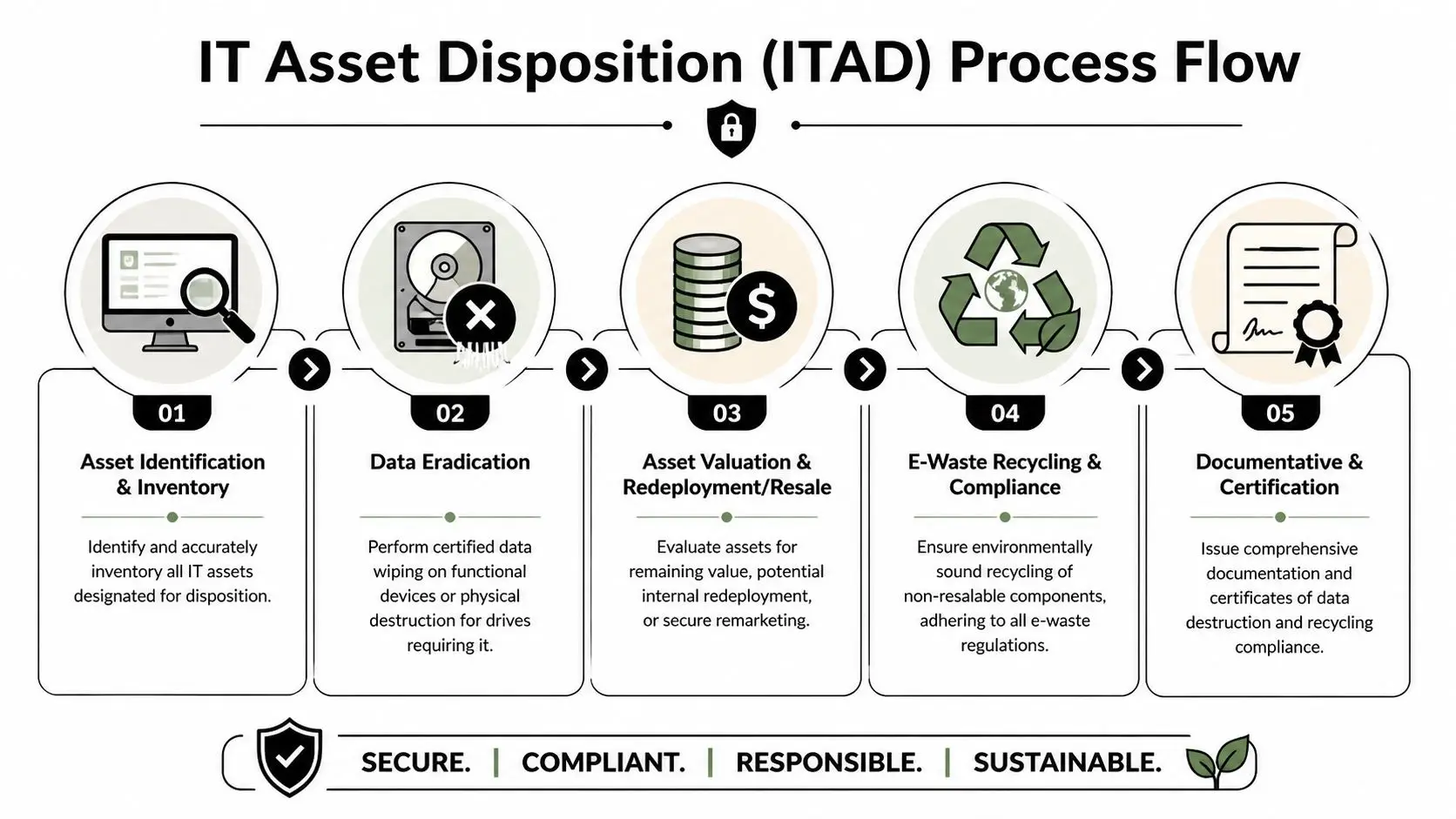
A mover’s job is transport. IT asset disposition, or ITAD, is a separate discipline. It answers different questions:
- Was data wiped or physically destroyed?
- Who had custody of the asset from pickup to final processing?
- Was anything remarketed or redeployed?
- What documentation proves the equipment was handled correctly?
That paperwork matters for internal audit, cyber insurance, legal review, and industry-specific compliance obligations. If a device leaves your office without a verifiable record, your risk didn’t leave with it.
Match the destruction method to the asset
Not every device should be handled the same way. Working endpoints may be suitable for certified data wiping before resale or redeployment. Failed drives, highly sensitive media, and equipment from regulated departments may require physical destruction.
A practical disposition workflow looks like this:
| Asset type | Usual handling path |
|---|---|
| Reusable laptops and desktops | Inventory, wipe, test, redeploy or remarket |
| Failed hard drives and SSDs | Physical destruction with documentation |
| Printers and copiers with storage | Media removal and destruction before release |
| Legacy network gear | Wipe or destroy based on configuration and sensitivity |
Risk check: If your mover says they “recycle electronics” but can’t explain certificates, custody records, or destruction methods, that’s not a compliance process.
Close the loop with documentation
The most valuable output isn’t the truck manifest. It’s the evidence package. You want serial-based inventory records, certificates of data destruction, certificates of recycling, and clear liability transfer documentation. Without that, disposal remains an assumption.
Organizations that need a documented path for regulated hardware often rely on structured data destruction services in Georgia because the relocation itself creates the best opportunity to remove old assets from the environment without a second project later.
The strongest office move is the one that leaves fewer unknown devices behind than it started with.
How to Choose a Reliable Atlanta Office Mover
By the time you’re collecting bids, you should already know your inventory, your IT constraints, and what equipment won’t be making the trip. That changes how you evaluate atlanta office movers. Price still matters, but it shouldn’t drive the decision by itself.
The better approach is to score movers on fit, controls, and execution discipline. The standard selection process is useful, but technology-heavy relocations need one extra screen.
According to Wirks Moving’s eight-step framework, a strong mover can be vetted through a structured methodology. For IT-heavy offices, the critical ninth step is confirming partnerships with certified ITAD firms for secure data destruction and electronics recycling.

What to ask in the first call
A serious commercial mover should be able to answer these without hand-waving:
- Commercial scope: What kinds of office and infrastructure moves do you handle most often?
- IT handling: How do you label, pack, and reinstall serialized devices?
- Sensitive assets: What’s your chain-of-custody procedure for servers, storage, and media?
- Insurance: What coverage applies to cargo, building requirements, and crew operations?
- Building logistics: How do you manage elevator reservations, dock timing, and after-hours access?
If the answers drift back to generic moving language, keep digging. You’re not buying a truck. You’re buying execution under constraints.
Compare quotes on risk, not just labor
A cheap quote can become expensive if it excludes the work that is important. One proposal may look lower because it assumes your team handles disconnects, cable removal, packing materials for electronics, or post-move device placement.
Use a comparison table before awarding the job:
| Criteria | Mover A | Mover B | Mover C |
|---|---|---|---|
| Dedicated project manager | |||
| Commercial office experience | |||
| IT equipment handling process | |||
| Documented inventory controls | |||
| ITAD coordination capability |
Add the ninth step
This is the step many teams miss. Ask who handles retired equipment, drive destruction, certificates, and recycling documentation. If the answer is “you can deal with that later,” you’ve found a gap in the plan.
A practical procurement review should include a formal vendor due diligence checklist. That keeps the selection process anchored in risk controls instead of sales language.
The right mover doesn’t just promise a smooth relocation. They show you how sensitive assets will be tracked, protected, and closed out.
Reliable movers welcome detailed questions. Weak ones try to shorten the conversation.
Managing Logistics, Costs, and Post-Move Success
A good move day feels almost uneventful. Trucks arrive in sequence, building access is ready, team leads know where to stand, labels match floor plans, and IT follows a controlled restart list. That kind of calm usually comes from hard preparation, not luck.
Cost control works the same way. Suddath notes that leading Atlanta office movers handle millions of square feet of commercial real estate annually, and average hourly rates for same-city moves are around $85. Those rates matter, but the budget usually gets damaged by poor planning, not by the base hourly charge.
What successful execution looks like
By the final week, the team should be working from a short operational checklist:
- Building access confirmed: Dock hours, elevator reservations, certificates, and parking are cleared.
- Department staging complete: Labels, seat maps, and unpack priorities are locked.
- IT cutover approved: Shutdown order and restart ownership are final.
- Retired assets isolated: Nothing slated for destruction gets mixed into move loads.
The first day in the new office should focus on function, not aesthetics. Get identity systems, network access, printing, conference rooms, and departmental critical tools working first. Fine-tuning can wait.
Judge the move by business recovery
Teams often call the move finished when the furniture is in place. That’s too early. The better test is whether people can do their jobs without hunting for equipment, waiting on credentials, or discovering that the copier with stored data was dropped in a common area with no owner.
For a helpful outside perspective on budgeting categories that tend to surprise leadership, understanding 2026 office move expenses is worth reviewing as a planning reference. Use it as a prompt list, not as a substitute for your own scope.
The strongest relocations in Atlanta follow a simple pattern. They reduce what needs to move, protect the systems that must stay live, and document the assets that need to leave the environment for good.
If your Atlanta move includes servers, employee devices, storage media, lab equipment, or retired electronics, Beyond Surplus can help with certified electronics recycling, secure IT asset disposition, hard drive destruction, and data center decommissioning support. Contact Beyond Surplus to close out the risky part of your relocation with documented chain-of-custody and compliant data destruction.