Your lease end date is approaching, department heads are asking for seat maps, and someone keeps forwarding furniture quotes as if desks are the hard part. They usually aren’t. In Atlanta office relocations, significant exposure sits in the server room, under workstations, inside conference room credenzas, and in every retired laptop that still holds business data.
That’s why smart teams searching for office movers atlanta shouldn’t treat the move as a furniture project with some IT tasks attached. It’s the opposite. Furniture is visible. Data risk is not. If you don’t plan for chain of custody, device triage, and final destruction records before move day, you’re creating a security problem while trying to solve a logistics problem.
Beyond Desks and Chairs Your Atlanta Office Move's Biggest Risk
Most Atlanta moving guides talk about packing order, loading docks, and weekend scheduling. Those matter. What they skip is the part that can follow your business long after the last crate is unloaded: improper handling of devices that store, process, or once contained sensitive information.
A 2025 Gartner report noted that 68% of enterprises faced data breach risks from improper IT disposal during moves, and Atlanta’s position as a tech hub with over 20,000 data centers makes that exposure harder to ignore, as cited by AC White. For facility managers and IT leaders, that means an office relocation is also a live data governance event.
What standard move planning misses
A typical mover will ask:
- how many desks and chairs are going
- whether there’s elevator access
- when the building dock is available
- how many file cabinets need to be packed
Those are necessary questions. They are not sufficient for a business move involving workstations, network gear, storage devices, copiers, phones, lab systems, or legacy hardware.
The hidden failure point
The mistake usually starts with a bad assumption: “We’ll decide what to do with old equipment after the move.” That sounds efficient. It rarely is.
Practical rule: If a device won’t be reinstalled in the new office, decide its disposition before move week.
When teams postpone that decision, old assets get mixed into active inventory, labels become unreliable, and responsibility gets blurred between the mover, internal IT, and whoever is supposed to recycle equipment later. That’s when drives walk, retired devices sit unsecured, and nobody can prove what happened to them.
The safer approach is to run the move as two linked workflows. One moves business-critical technology into the new space. The other removes end-of-life equipment through a controlled ITAD process with documented handling, data destruction, and recycling.
Strategic Planning and Scoping Your Relocation
The move gets easier when you stop asking, “How do we move everything?” and start asking, “What deserves to be moved?” The scoping phase decides budget, risk level, staffing pressure, and how much chaos you’ll inherit after cutover.

Leading commercial movers use a four-step project methodology, and the Initiation phase starts with a 100% asset inventory and documented IT disposal requirements such as NIST 800-88 compliant hard drive wiping. Poor scoping at this stage is a primary risk factor in 40% of office moves, according to Kenpro’s review of moving project risk factors.
Build three asset lanes
Don’t use one giant inventory list. Split assets into operational lanes:
Move
Production equipment that will be reinstalled in the new location. Think active workstations, monitors in usable condition, switches, conference room systems, and line-of-business devices.Dispose or recycle
Equipment that’s obsolete, failed, unneeded, or too risky to transport. This often includes aging laptops, decommissioned servers, bad batteries, broken displays, and surplus networking gear.Upgrade or replace
Assets that still work but no longer fit the new office design, security policy, or support model.
That one decision cleans up everything else. Truck space improves. Labeling gets cleaner. Your IT team doesn’t waste time reinstalling gear that should have left the environment months earlier.
Scope the move by business function
Inventory by department is useful, but inventory by business function is better. Finance, operations, HR, engineering, and customer support all have different tolerance for downtime and different data handling needs.
Use a practical scoping sheet that includes:
- Asset owner: who signs off on move, recycle, or replacement
- Data sensitivity: low, moderate, high, or regulated
- Destination: new office, secure storage, or ITAD stream
- Dependencies: dock, electrician, ISP, low-voltage cabling, installer
- Recovery need: whether the asset has resale value or should be destroyed
A separate planning document for budgeting for your office move can also help align facilities, finance, and IT before purchase orders start piling up.
Define success before vendors quote
If your internal team can’t define success, vendors will fill in the blanks for you. Sometimes that works. Often it doesn’t.
Use a few hard operational goals:
| Decision area | What to define early |
|---|---|
| Business continuity | Which teams must be live first on day one |
| IT handling | What gets wiped, shredded, recycled, moved, or sold |
| Site readiness | Power, cabling, racks, storage rooms, and receiving access |
| Documentation | What manifests, serial logs, and certificates must be delivered |
For relocation-specific planning templates and asset coordination steps, many teams use an office relocation workflow to align movers, facilities, and downstream IT disposition.
If your inventory doesn’t tell you what each device is, who owns it, and where it’s going next, it isn’t ready for move execution.
Your Atlanta Office Move Timeline and Checklist
A workable timeline prevents two common failures. First, vendors arrive with different assumptions. Second, internal teams wait too long to make irreversible decisions, especially around decommissioning and disposal.
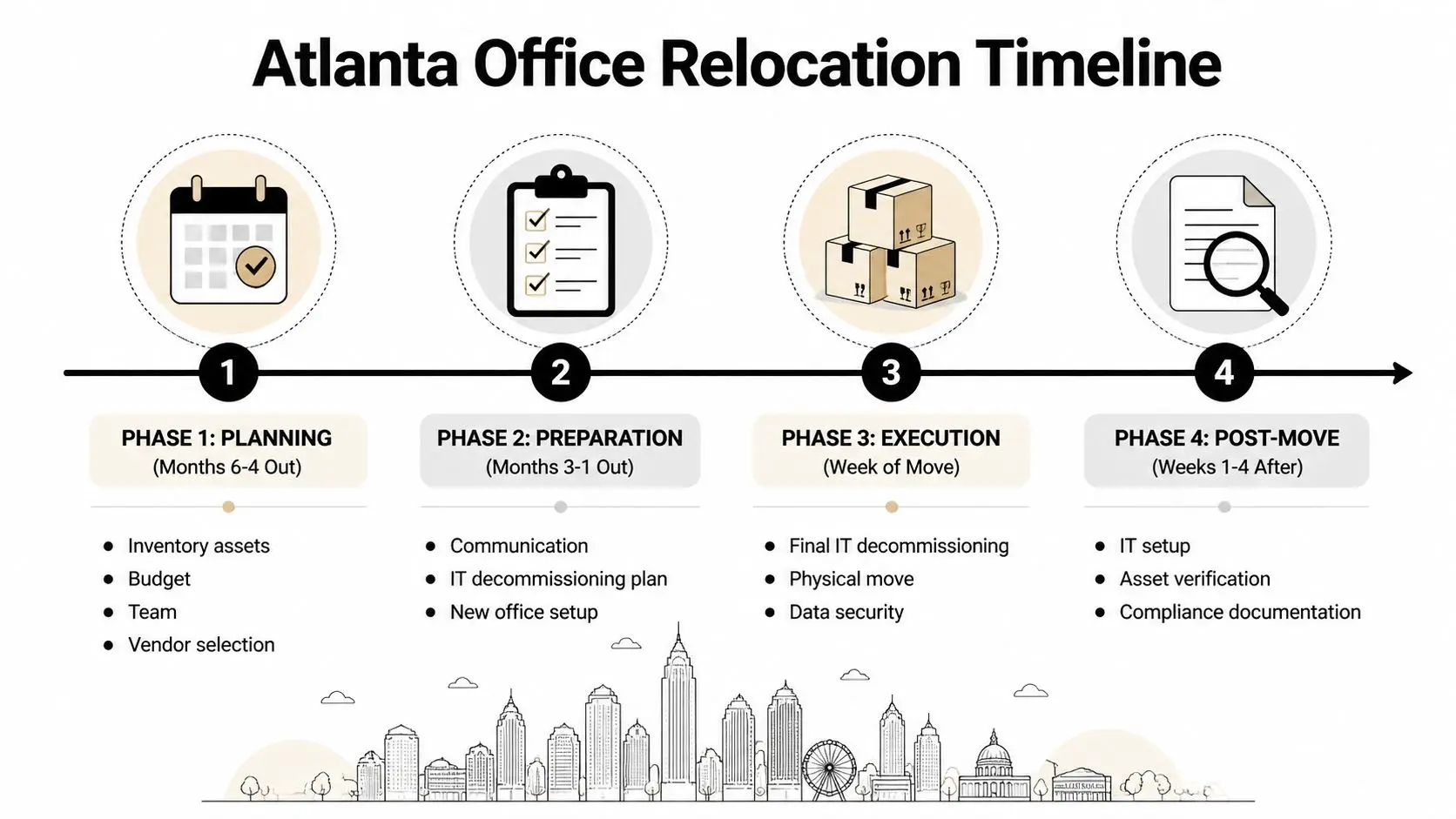
Months before move day
This is when the move either becomes orderly or expensive. Start with your steering group. Keep it small enough to make decisions and broad enough to represent facilities, IT, security, operations, and finance.
At this stage, handle the fundamentals:
- Assign ownership: One project lead, one IT lead, one facilities lead, one vendor contact.
- Freeze major scope changes: If departments can add furniture or equipment requests indefinitely, the project won’t stabilize.
- Review building rules: Loading dock reservations, insurance requirements, after-hours access, elevator windows, and certificate deadlines.
- Triage old technology: Separate active equipment from retired or questionable devices early.
The thirty-day window
This period is operational, not theoretical. Every unresolved decision starts to affect move sequencing.
Use a checklist like this:
- Confirm room-by-room labeling: Match origin, destination, and asset class.
- Back up critical systems: Don’t rely on the move team to protect data continuity.
- Stage nonessential surplus: Get unused monitors, printers, phones, and accessories out of active work areas.
- Verify chain of custody: If devices are leaving the business permanently, make sure the handoff process is written down.
- Check receiving conditions: Power, network, and furniture installation shouldn’t be guessed on arrival.
Building access causes more problems than teams expect. Service elevator reservations, dock timing, and after-hours approvals can delay a clean move even when packing is perfect.
Move week discipline
Move week needs command structure. Not more meetings. One person should approve exceptions, and every vendor should know who that is.
The field rules should be simple:
- no unlabeled technology moves
- no retired devices loaded “just in case”
- no personal storage of company electronics
- no last-minute disposal pile without inventory review
A color-coded labeling system works well. One color for reinstall, one for storage, one for secure disposition. Keep printed manifests with the floor captain and digital copies with the project lead.
The first weeks after occupancy
Many services focus on getting users seated. That’s only half the job. The rest is verification.
Run a post-move closeout list:
| Phase | Critical actions |
|---|---|
| Day 1 | Verify internet, phones, shared printers, conference rooms, badge access |
| Days 2 to 5 | Reconcile missing assets, resolve cabling issues, remove packing debris |
| Week 2 onward | Finalize surplus pickup records, confirm recycling and destruction documents, archive project files |
The best timelines have one trait in common. They don’t treat IT disposition as cleanup. They treat it as a scheduled workstream with deadlines, manifests, and signoff.
Vetting and Contracting Atlanta Office Movers
At vendor selection, a lot of office relocations go off course. The proposal looks clean, the truck count sounds adequate, and the mover says they handle corporate work all the time. Then move day exposes the gap. Monitors ride loose, disconnected equipment arrives without asset IDs, and nobody can answer who signed for the retired laptops set aside for disposal.

That is why office movers atlanta comparisons should start with risk control, not just price. For a move with servers, executive devices, shared workstations, VoIP hardware, or regulated records, the mover is part of your custody chain. If they treat technology like furniture, your team inherits the downtime, missing asset research, and compliance exposure.
A capable commercial mover changes the outcome in specific ways. The crew uses proper pack materials for screens and peripherals. The supervisor controls floor sequence so disconnects, loading, and delivery happen in the right order. The company can also work alongside your IT staff, cabling vendor, and disposition partner without turning every handoff into an argument about scope.
Ask better questions in the RFP. Generic questions get polished sales answers. Operational questions expose whether the mover has a repeatable process or is planning to improvise in your office.
- Electronics packing: What containers, padding, and labeling methods do you use for monitors, docks, desktops, and rack gear?
- Asset control: How do you track serialized devices from pickup through delivery?
- Commercial crew experience: Are the assigned crews trained for office environments, or are they mixed between residential and commercial jobs?
- Supervisor authority: Who can approve sequence changes, exception handling, and damage escalation on move day?
- Claims handling: What documentation do you require if a device arrives damaged or missing?
- Vendor coordination: How do you handle handoffs to cabling teams, decommissioning teams, or an ITAD vendor?
Procurement teams usually need a side-by-side review tool to keep these interviews disciplined. A practical vendor due diligence checklist for office move providers helps separate real controls from good presentation.
Watch for proposal language that hides risk. “Customer to disconnect all technology” may be fine if your internal IT team is staffed for it. “Mover not responsible for electronic functionality” is a bigger concern if the same mover is packing and transporting critical devices. Clear exclusions are not a problem by themselves. Unclear responsibility between mover, IT team, and disposition vendor is the problem.
Use a comparison grid before you award the job:
| Criteria | Strong answer | Weak answer |
|---|---|---|
| Commercial specialization | Documented office move process and trained commercial crews | “We handle all kinds of moves” |
| Scope clarity | Written responsibilities, exclusions, and handoff points | Broad proposal with vague wording |
| Technology handling | Defined packing, labeling, and delivery controls for devices | Treats all contents the same |
| Coordination | Comfortable working with IT, facilities, and ITAD vendors | Expects customer to sort it out onsite |
| Claims process | Written escalation path and documentation steps | Verbal assurances only |
One more contracting point gets missed often. Insurance certificates and licensing matter, but they do not prove the mover can protect data-bearing assets. The contract should state who packs technology, who signs custody transfers, who handles retired equipment, and what happens if an item cannot be reconciled at destination.
A low quote can still become the expensive option if your team spends the next week tracing missing assets, rebuilding failed workstations, and explaining why surplus devices left the building without a documented chain of custody.
Executing a Secure IT and Data Relocation
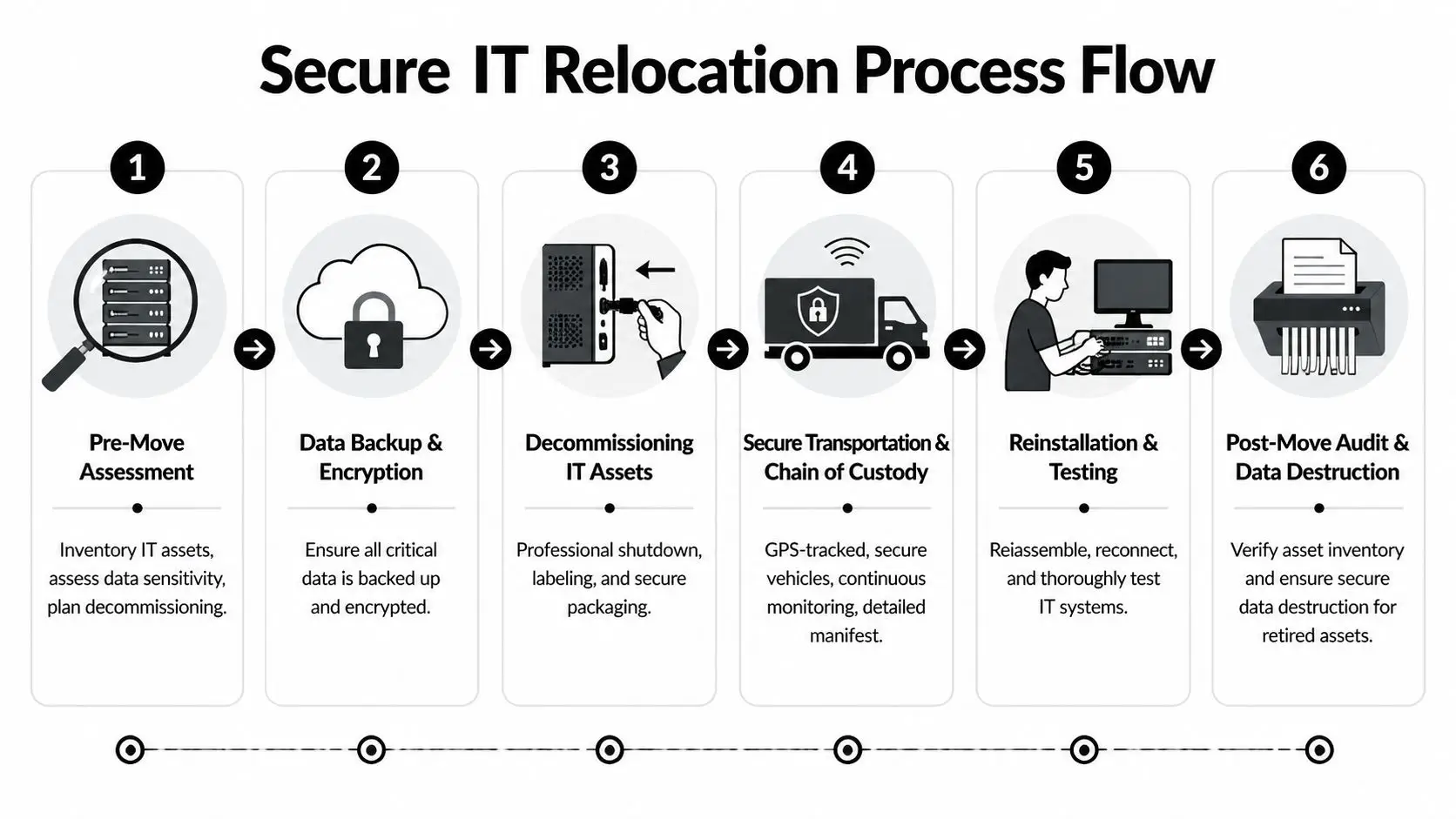
This phase is where planning becomes custody. Once equipment is powered down, disconnected, packed, or removed from controlled areas, you need to know what moved, what stayed, what was retired, and who signed for each handoff.
Separate active devices from disposition assets
Never decommission and relocate from the same cart without clear separation. It sounds obvious, but mixed loads are one of the fastest ways to lose control of inventory.
Use two streams:
- Reinstall stream: devices going to the new office
- Disposition stream: devices going to wipe, shred, resale, recycling, or destruction
For the disposition stream, create a serialized manifest before pickup. If a device holds storage media, decide whether it requires wiping, physical destruction, or both. For regulated environments, that decision should be approved before move day, not improvised in the parking lot.
Chain of custody has to be visible
A secure process is boring by design. Every unit is tagged. Every tote is sealed when needed. Every transfer is logged. Everyone touching the equipment is known.
The handoff record should include:
- asset description and serial number
- origin location
- assigned disposition method
- pickup date
- releasing contact
- receiving contact
If you need commercial relocation partners who understand these workflows, this overview of office relocation companies with IT asset considerations is a useful starting point.
Sustainability matters when the audit starts
Recycling isn’t just a green talking point. It’s part of defensible asset closeout. U.S. offices generate 2.5 million tons of e-waste annually, and only 25% is responsibly recycled. The same source notes that IT buyback programs can return an average of $500 to $2,000 per ton, according to Beltmann’s Atlanta commercial moving page.
That creates a practical trade-off. Some hardware should be destroyed because the data risk or device condition makes recovery a bad idea. Other assets still have resale value, and a documented buyback stream can offset project cost while keeping disposal records clean.
Move-day handling rules that work
Good teams keep the field process simple:
- Power down correctly: Don’t let untrained crews disconnect live equipment without IT oversight.
- Label for destination, not description: “HR-24-New Office-West” is better than “black monitor.”
- Use protected packaging: Antistatic materials and proper stacking matter for electronics.
- Audit at both ends: Check what leaves and what arrives. Don’t wait until Monday to discover gaps.
When a company can’t prove where a retired laptop went after it left the office, the problem isn’t recycling. The problem is custody.
Post-Move Audits and Compliance Documentation
Monday at 8:15 a.m., the new office looks operational. Users are logged in, conference rooms are live, and the move appears done. Then someone asks for the disposition record for three retired laptops, and no one can show where custody ended. That is when a routine relocation becomes a compliance problem.

Post-move review has two jobs. Confirm that production equipment is where it belongs and working. Prove that anything retired, recycled, or destroyed was handled under documented chain of custody.
Audit what changed, not just what arrived
Start with exceptions. Devices in storage, equipment marked for disposal, loaner units, and anything that missed reinstall deserve attention before standard desktop setups. In my experience, the expensive problems usually come from edge cases, not the rows of monitors that made it to the right floor.
Reconcile the final inventory against three buckets: assets returned to service, assets held for later use, and assets sent to disposition. Then verify who owns each item now. A powered-on workstation with no assigned user is still an open control issue.
The review should confirm:
- active systems are online, encrypted where required, and assigned to the correct user or department
- retired devices are not sitting unsecured in closets, staging rooms, or vendor cages
- serial numbers on pickup manifests match the actual destruction or recycling outcome
- department owners, IT, and facilities sign off on exceptions and unresolved variances
Small losses matter here. A missing dock or adapter is a purchasing issue. A missing laptop, firewall, or backup drive triggers a very different response, especially if regulated data may have been stored on it.
Documentation closes the risk file
As noted earlier, vendor reliability matters. At the closeout stage, reliability shows up in records, not promises.
The final package usually includes certificates of data destruction, certificates of recycling, serialized asset reports, bills of lading or pickup records, and handoff logs with dates and responsible parties. Keep those records together with the move file, not scattered across email threads between IT, facilities, and procurement.
If your team needs a clean standard for what to retain, use this destruction certificate template for IT asset disposition records. It helps define what auditors, security teams, and legal reviewers typically expect to see later.
One rule is simple. If a device left your office, the file should show who had it, what happened to it, and when that status changed. If you cannot prove those three points, the move is not fully closed.
Streamline Your Atlanta Office Move with Secure ITAD
The best office movers atlanta strategy isn’t just about getting desks into a new suite. It’s about controlling technology risk from the first inventory review to the last certificate filed. When your move plan includes structured IT disposition, secure data handling, and documented recycling, the relocation becomes easier to manage and easier to defend.
For Atlanta businesses moving offices, expanding operations, or clearing legacy equipment during a transition, secure ITAD should be part of the plan from day one. Learn more about Atlanta ITAD services that support business relocations, equipment disposition, and compliant data destruction.
Contact Beyond Surplus for certified electronics recycling and secure IT asset disposal that supports a safer Atlanta office move.