Your lease is signed. The floor plan looks cleaner. Leadership wants the move done with minimal disruption. Then key questions land on your desk. Who’s shutting down the network? What happens to retired laptops in the storage room? How do you move servers without creating a data security problem? Who documents disposal so compliance isn’t left guessing later?
That’s where office relocation services stop being a moving expense and start becoming a risk-control function. A business move isn’t just desks, chairs, and file cabinets. It’s power capacity, network readiness, chain of custody, asset tracking, vendor coordination, and a clean handoff from old site to new site.
A flawless move usually looks uneventful from the outside. Employees log in, phones work, conference rooms come online, and old equipment doesn’t linger in a back hallway waiting for someone to “deal with it later.” That outcome takes planning, specialized handling, and the discipline to treat relocation as an operational project with security and compliance built in.
Planning Your Business Move Beyond Boxes and Furniture
Most office moves fail in the same place. Teams plan the visible work and underestimate the technical work. Furniture gets tagged, movers get scheduled, and the new office gets painted. Meanwhile, nobody has confirmed switch port layouts, backup status, ISP turn-up dates, or how obsolete hardware will leave the building securely.

A well-run move starts before the first box is packed. Facilities, IT, security, compliance, and department leads need one shared plan. If the new office needs construction or finish work before occupancy, this guide to commercial build-outs is useful for understanding how site preparation affects move sequencing.
What experienced teams plan first
The first pass should answer a few operational questions:
- What must stay live: Identify systems that can’t tolerate interruption, including line-of-business apps, VoIP, badge access, print management, and network core equipment.
- What is moving versus retiring: Separate deployable assets from obsolete devices before staging starts. That keeps junk from traveling to the new office.
- Who owns each decision: Assign one accountable owner for telecom, cabling, furniture, server shutdown, records, and surplus removal.
- What the exit condition is: Define what “done” means at the old site, especially for cleanout, decommissioning, and proof of asset disposition.
If you’re clearing work areas as part of the move, coordinated office cleanout services can prevent surplus equipment from blocking staging zones and loading paths.
Practical rule: If a move plan doesn’t include IT shutdown order, data handling, and end-of-life equipment removal, it isn’t complete.
The Spectrum of Professional Relocation Services
The failure point in many office moves is not the truck. It is the assumption that one vendor can handle furniture, live infrastructure, retired devices, and regulated data with the same controls.
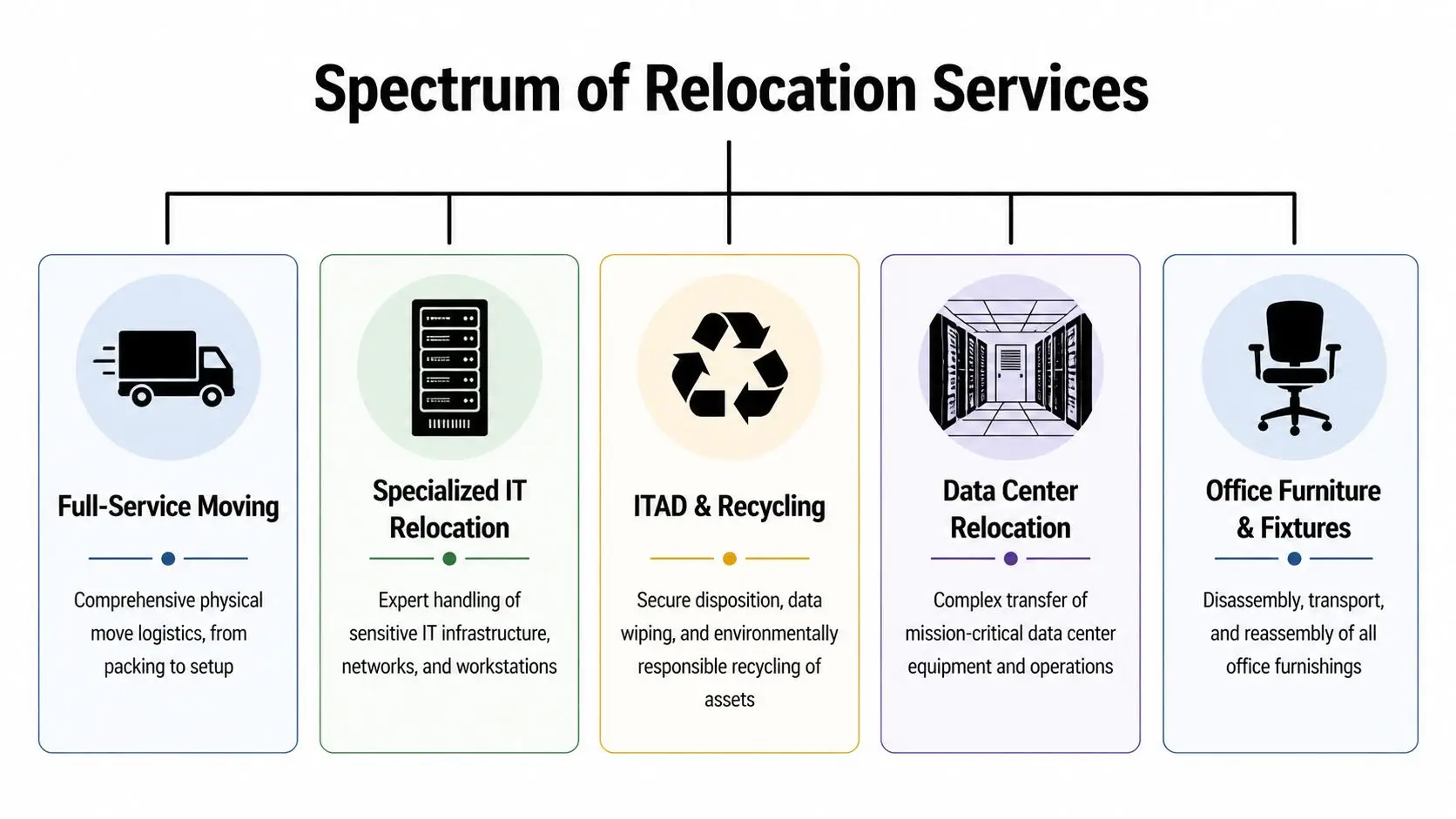
A relocation plan usually spans several service categories. The right mix depends on what is being moved, what is being retired, and what could expose the business if handled poorly.
Full-service moving
Traditional movers cover packing, labeling, transport, dock scheduling, and placement of furniture and general office contents. That work matters, especially in multi-floor or multi-phase moves where building access and timing drive the schedule.
It does not qualify a crew to disconnect switches, move storage arrays, handle backup media, or transport devices that may still hold customer or employee data. Facilities teams that blur that line create avoidable risk.
Specialized IT relocation
IT relocation is a separate discipline because the job is not just to move equipment. The job is to preserve service order, configuration accuracy, and chain of custody from shutdown through restart.
A capable IT move team handles asset inventory, cable and port mapping, staged shutdowns, anti-static packing, transport controls, rack placement, and restart sequencing. They also document what changed so support teams are not guessing after cutover. That is the difference between a controlled migration and a Monday morning outage hunt.
ITAD and electronics recycling
Office moves expose a problem many companies have postponed for years. Old laptops in storage, failed drives, retired access points, surplus monitors, and test gear often get packed by default because no one owns the disposition decision.
Secure disposition needs its own workstream. IT asset disposition services cover serial tracking, data wiping or physical destruction, remarketing where equipment still has value, and certified recycling for assets that should not be redeployed. This step protects the business on two fronts. It reduces moving volume and closes a common compliance gap that standard relocation guides usually ignore.
Data center relocation
Data center and server room moves sit in a higher-risk category. The sequence matters because applications, storage, virtualization hosts, firewalls, and circuits depend on each other in ways that are easy to miss on a basic move sheet.
These projects usually require dependency mapping, cabinet and rack plans, controlled shutdown windows, transport protections, environmental controls, and a tested cutover plan. If the business cannot tolerate extended downtime, some systems should be migrated before move day rather than physically relocated.
Furniture, fixtures, and site transition work
Furniture decommissioning, fixture removal, space reconfiguration, and old-site turnover often run in parallel with the IT plan. That creates practical conflicts. Crews compete for elevators, loading docks, staging areas, and after-hours access windows.
Good relocation management resolves those conflicts before move week. The service categories may look separate on paper, but execution fails when they are not coordinated.
General movers transport items. Specialized relocation partners protect uptime, data security, and documented compliance.
Your Step-by-Step Relocation Planning Checklist
At 8:15 a.m. on the first business day in a new office, the failures show up fast. Staff can’t connect to Wi-Fi, a conference room has no video, the copier is on the wrong floor, and two retired laptops are still sitting in a crate with no documented disposition path. A workable relocation plan prevents those avoidable misses by assigning owners, deadlines, dependencies, and acceptance checks before move week.
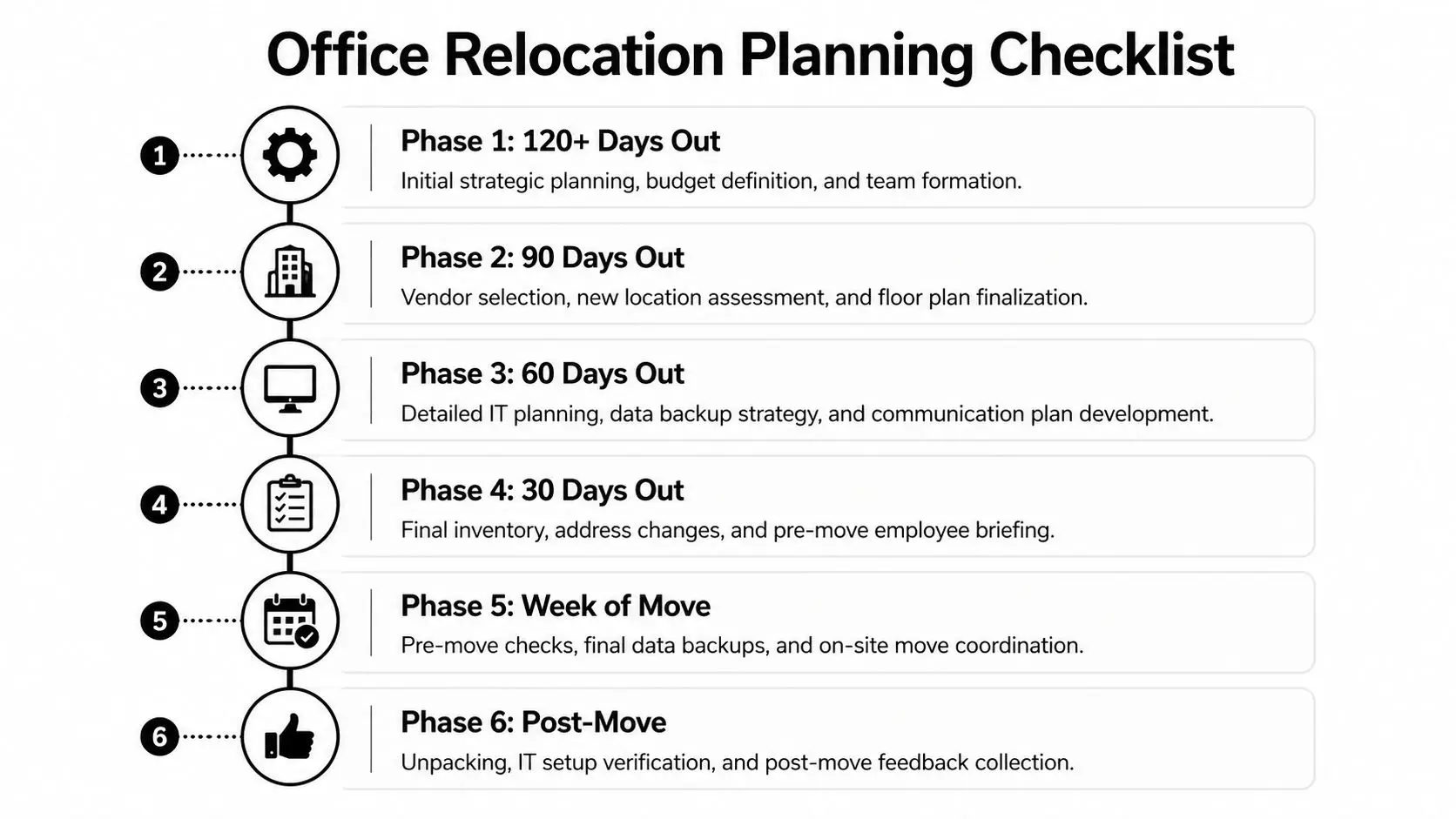
120 plus days out
Form the move team early. Assign an executive sponsor, facilities lead, IT lead, security contact, HR contact, legal or compliance contact, and procurement owner. Define scope by department, then split inventory into four buckets: assets that move, assets that get replaced, assets that go to secure ITAD and data destruction, and assets that require certified recycling.
Inspect the new site before vendors lock their assumptions. Check power capacity with headroom above current peak demand, carrier availability, riser access, rack and closet locations, life-safety constraints, and lease conditions that affect construction or after-hours work. This is also the right point to decide who signs off on data-bearing assets leaving the old office. If your team needs a screening framework, use a vendor due diligence checklist for ITAD and relocation providers.
90 days out
Survey the destination in detail and compare the floor plan to actual operating needs. Confirm panel schedules, UPS requirements, MDF and IDF readiness, ISP install dates, wireless density, badge access, camera coverage, storage areas, and freight elevator rules.
Build a move matrix that shows dependencies, not just tasks.
| Workstream | Owner | Dependency | Go-live check |
|---|---|---|---|
| Network and internet | IT | ISP turn-up, cabling complete | Connectivity verified |
| Phones and conferencing | IT and telecom | Network live | Calling and rooms tested |
| Furniture and fixtures | Facilities | Floor plan locked | Departments seated correctly |
| Surplus and retired assets | IT and compliance | Inventory complete | Removal documented |
Many projects often drift at this stage. Teams plan what is arriving at the new office, but they do not define what leaves the old one under chain-of-custody controls.
60 days out
Finalize the asset inventory. Label every device by destination, user or department, retire status, and handling method. Separate production hardware from surplus now, not during the loading window.
Then document the technical sequence in plain language. Backups must be verified, shutdown order must be approved, and restart priority must match business operations. For a server room, lab, or network core, map dependencies so a shared switch, firewall, storage array, or circuit is not taken down before the downstream systems are ready.
Do not save your first real network and application test for move day.
At this stage, confirm the disposition path for anything that will not be reinstalled. Drives may need wiping or physical destruction. End-user devices may have resale value. Broken electronics may need certified recycling. Those decisions affect labor, truck space, compliance records, and who is allowed to handle the equipment.
30 days out
Employee communication now needs specifics, not general reminders. Tell staff what they pack themselves, what stays in place for movers, when systems will go offline, how loaner equipment is handled, and where to report issues after cutover.
Complete address changes, vendor notifications, access lists, parking and loading instructions, building certificates, and any required landlord approvals. Run a tabletop exercise for the move weekend with IT, facilities, telecom, security, the mover, and the ITAD or recycling provider on the same call. That meeting should answer one practical question for each workstream: what has to be true before your team can start?
Week of move
Freeze nonessential changes. Run final backups, confirm truck schedules, verify certificates of insurance, reserve freight elevators, protect floors, and walk both sites with the current floor plan and staging map in hand.
Use one command channel during execution. One designated lead should approve sequence changes, call delays, and release each crew into its work area. That keeps furniture installers from occupying telecom rooms, prevents surplus pallets from blocking rack delivery, and reduces the chance that data-bearing devices leave the site without being logged.
Small controls matter here. Count serialized assets at handoff. Photograph packed racks and high-value equipment. Confirm tamper-evident handling where required. Reconcile what was loaded, what arrived, and what went directly into disposition.
Post-move
Do not close the project when the trucks leave. Validate wired and wireless connectivity, VoIP, printer queues, badge access, conference rooms, line-of-business applications, backup jobs, and environmental conditions in any IT spaces.
Then close the old office properly. Remove residual media, collect abandoned devices, document final disposition, and make sure certificates for data destruction and recycling are filed where compliance and audit teams can retrieve them. A post-move review should also capture what the relocation exposed, including weak Wi-Fi coverage, overloaded circuits, poor asset records, or undocumented equipment that should have been retired before the move.
How to Select the Right Relocation Partner
The wrong relocation vendor creates risk that won’t appear on the quote. Cheap pricing can hide weak custody procedures, vague insurance language, and no answer for legacy equipment holding sensitive data.
One of the biggest blind spots is liability transfer. Traditional relocation content rarely explains how organizations formally transfer liability for old equipment and data, or how they obtain certificates of recycling and data destruction that support audit needs under rules such as the FTC Disposal Rule, as noted in this discussion of office relocation documentation gaps.
What matters more than the base quote
Ask vendors how they inventory devices, who handles data-bearing assets, what proof they issue after disposal, and how they separate reusable equipment from scrap. Ask for the handoff process in writing.
A serious partner should also be comfortable with due diligence. This vendor due diligence checklist is a practical way to compare providers before the contract is signed.
Vendor Selection Criteria Checklist
| Criterion | Importance | What to Ask |
|---|---|---|
| Chain of custody | Protects data-bearing assets in transit and during removal | How is each asset tracked from pickup to final disposition? |
| Data destruction process | Supports secure handling of drives and devices | Do you provide wiping or shredding documentation? |
| Certificates and reporting | Helps transfer liability and support audits | What reports and certificates are issued at project close? |
| IT relocation experience | Reduces avoidable downtime | Who handles racks, network gear, and server shutdown sequencing? |
| Insurance coverage | Limits exposure if equipment is damaged | What coverage applies to high-value IT equipment? |
| Coordination with facilities | Prevents scheduling conflict | How do you manage dock access, elevators, and phased occupancy? |
| Recycling and disposition options | Keeps obsolete assets out of the new office | What happens to devices that shouldn’t be redeployed? |
Red flags that should stop the process
Some answers should concern you immediately:
- “We can figure it out on site.” That usually means no documented process.
- “We don’t handle the old equipment.” Then you still have a compliance problem after the move.
- “We’ll send a summary later.” If reporting isn’t defined up front, it often arrives incomplete.
- “Your internal team can disconnect everything.” That can work for simple endpoints, but not for every environment.
A relocation partner should reduce operational risk. If they create ambiguity around data, insurance, or custody, keep looking.
Budgeting for Your Office Move and Key Cost Drivers
Office moves are expensive because they combine logistics, labor, downtime risk, and technical dependencies into one project. The market reflects that steady demand. The global office relocation services market was valued at US$10.6 billion in 2022 and is projected to reach US$14.6 billion by 2032 at a 3.3% CAGR, according to Fact.MR’s office relocation services market report.
In the U.S., costs average $0.75 to $2.50 per square foot, and interstate moves can rise 30 to 70% because of logistics complexity, freight, and compliance demands in that same report. That range is useful for early budgeting, but it doesn’t tell you what drives overruns.
The cost drivers that usually matter most
Distance matters, but complexity matters more. A local move with dense IT infrastructure, after-hours cutover, and phased occupancy can be more difficult than a straightforward regional move.
Budget pressure often comes from these items:
- Technical handling: Server shutdown, reconnect work, cable remediation, and testing.
- Schedule constraints: Night and weekend labor costs more, but it may still be cheaper than weekday disruption.
- Staging and storage: Temporary storage helps phased migrations, but it adds handling steps.
- Data-bearing equipment: Drives, copiers, appliances, and old endpoints need controlled disposition.
- Old-site closeout: Furniture removal, recycling, and sweep-out are often underestimated.
Build the budget in layers
Start with transport and labor. Add a separate line for IT relocation. Add another for decommissioning and secure media handling. Then include contingency for unknowns at the new site, especially cabling, power corrections, and post-move troubleshooting.
If your project includes retiring storage devices, budgeting for destruction early is smarter than treating it as a cleanup item later. This overview of hard drive shredding cost helps frame that line item realistically.
A lean budget is fine. An incomplete budget isn’t.
Integrating ITAD and Recycling into Your Relocation Strategy
Most relocation plans still treat obsolete technology as someone else’s problem. That’s a mistake. Office relocation is when hidden hardware surfaces. Closets get emptied. Storage rooms get opened. Old access points, printers, thin clients, monitors, docking stations, and failed laptops suddenly become visible. If you don’t have an ITAD plan, those assets either travel unnecessarily or get abandoned at the old site.
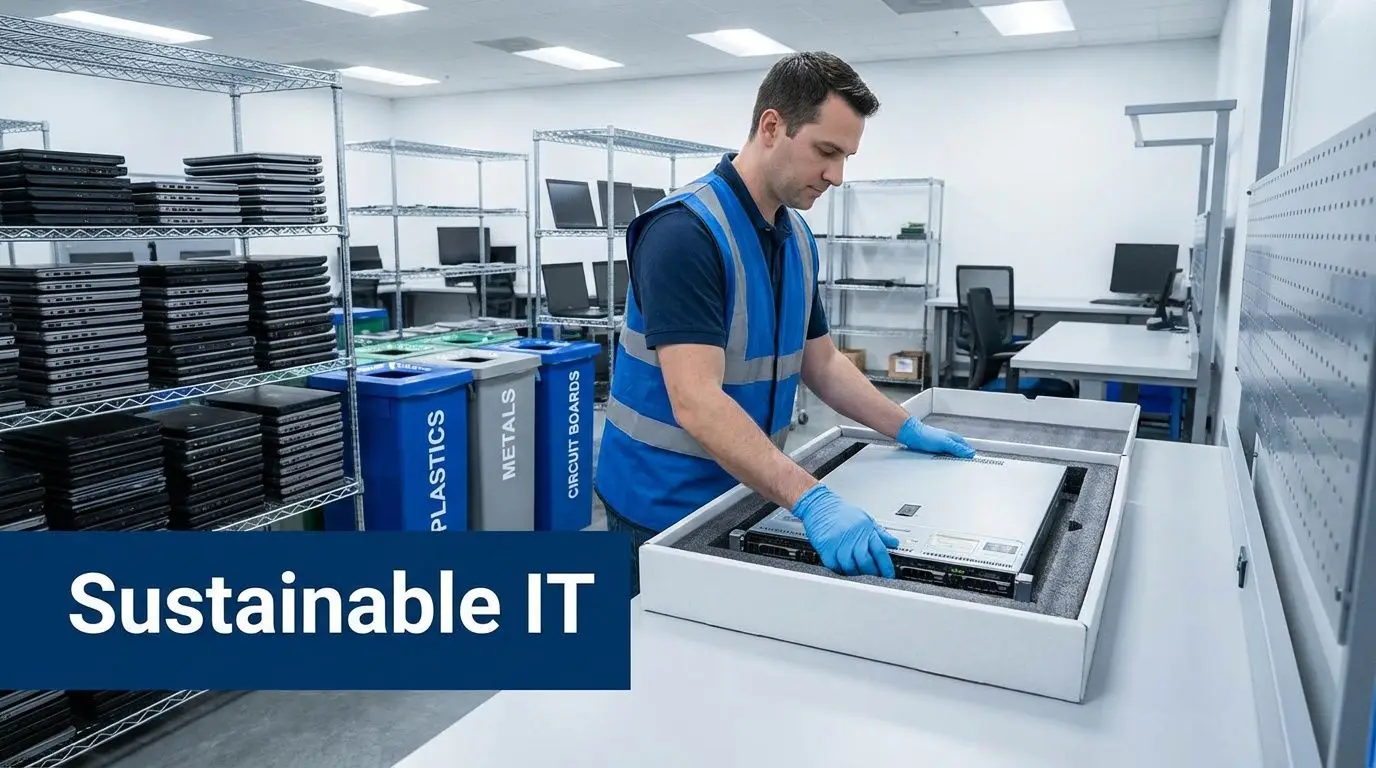
Typical office relocation advice rarely addresses IT infrastructure decommissioning, secure data destruction, or compliant disposal of legacy systems, creating a real blind spot for regulated organizations, as noted in this review of office relocation planning gaps.
Why separate projects create more risk
When moving and disposition are handled separately, teams duplicate effort. Someone inventories the same device twice. Old hardware sits unsecured while the move gets prioritized. Retired drives stay in desk drawers because the mover doesn’t own disposal and IT is busy bringing up the new office.
That creates three avoidable problems:
- Security exposure: A retired device still holds data until it is wiped or destroyed.
- Compliance exposure: If no one issues final documentation, you’re left with a story instead of proof.
- Operational drag: Surplus equipment clutters loading areas, staging rooms, and new-office storage.
What an integrated process looks like
The better model is simple. Inventory all equipment before the move. Tag each asset as move, redeploy, sell, recycle, or destroy. Remove non-deploying assets before move weekend. Keep serial-based records. Close the project with documentation.
For organizations that want one workflow for pickup, secure data destruction, electronics recycling, and certificates of recycling or data destruction, Beyond Surplus is one example of an ITAD provider that supports relocation-related asset disposition.
If an asset isn’t going to provide value in the new office, don’t pay to move it.
Mitigating Risk with Strategic Timelines and Compliance
Friday at 6 p.m., the last employees leave the old office. By Monday at 8 a.m., staff expect Wi-Fi, phones, printers, badge access, conference rooms, and line-of-business systems to work. The difference between a controlled cutover and a painful restart usually comes down to timeline discipline, documented ownership, and how early the team handles retired equipment that still holds data.
Office moves fail in predictable ways. Someone approves furniture delivery before circuits are tested. Network gear arrives before racks are ready. A batch of old laptops gets pulled from service but sits untracked in a staging room because no one assigned disposition. Those are planning failures, not moving problems.
Treat the move like a continuity event
Run the relocation on the same control model used for outages and disaster recovery. If your team already works from a disaster readiness plan, use the same structure here. Define command roles, escalation paths, rollback criteria, user communications, and recovery priorities before move weekend.
Compliance belongs on that timeline, not in a follow-up email after the move. Set dates for inventory freeze, chain-of-custody transfer, sanitization approval, destruction or recycling pickup, and final document review. If regulated data is involved, legal, compliance, IT, and facilities should all know who signs off at each step.
Controls that prevent avoidable losses
The strongest relocation plans use a few simple controls consistently:
- Change freeze before cutover: Stop nonessential IT changes so the baseline stays stable.
- Readiness gates: Do not move core systems until power, cooling, circuits, cabling, and physical security are verified at the new site.
- Asset disposition deadlines: Remove surplus and end-of-life equipment before move weekend so it does not mix with production assets.
- Serial-level tracking: Record what was relocated, redeployed, wiped, destroyed, or sent to recycling.
- User-side validation: Test logins, printing, calling, conferencing, and critical applications from actual workstations.
The ITAD piece deserves special attention because it is easy to postpone and expensive to get wrong. A retired firewall, copier hard drive, or desktop is still a data-bearing asset until it has been sanitized or destroyed under a documented process. Teams that wait until after occupancy usually lose custody clarity, and that is exactly what auditors question later. For media handling standards, review NIST SP 800-88 data sanitization guidance before the project starts.
A well-run move leaves a short paper trail and few surprises. Systems come up in order. Retired devices do not follow the company into the new office. If an auditor asks what happened to every data-bearing asset touched during the relocation, the answer is already documented.
Frequently Asked Questions About Office Relocation
How far in advance should we start planning
Start as early as practical, especially if the move includes server rooms, telecom changes, or phased occupancy. The longer lead time is usually spent on site readiness, inventories, vendor coordination, and decision-making, not packing boxes.
Can our internal IT team handle the move
They can handle parts of it. Internal teams usually know the environment best. But knowledge of the environment isn’t the same as having the labor, transport controls, custody procedures, and disposition workflow needed for a relocation. Use internal IT for ownership and validation. Use specialized help for execution where risk is high.
What should happen to equipment we don’t want to move
Decide early whether each asset should be redeployed, resold, recycled, or destroyed. Don’t let obsolete equipment follow the company into the new office by default.
Do general movers handle data destruction
Usually not in a compliance-focused way. If a device stores data, disposal needs explicit handling, documentation, and custody controls.
What’s the biggest mistake companies make
They treat the move as a furniture project. The harder part is protecting uptime, data, and documentation while the physical move is happening.
Contact Beyond Surplus for certified electronics recycling and secure IT asset disposal that fits into your office relocation plan.